It is Wednesday evening. The gig is Friday. You open a new AI DJ tool, type something like "melodic techno, building energy, two hours," and wait.
It gives you a playlist. Seventy tracks. Most of them from Spotify or Beatport streaming. None of them from the local library you have spent three years building.
That is the gap nobody talks about in the AI DJ conversation right now.
What AI DJ tools are actually good at
The honest answer: quite a lot, in the right context.
In 2026, around three quarters of DJs who use AI are using it for music discovery and playlist creation. Tools like VirtualDJ's new AI set builder, PulseDJ, and MusicMate are genuinely useful for generating starting points, especially when you are working with streaming catalogues or when you do not have strong opinions about which tracks to use.
AI tools are also reliable for the technical groundwork: BPM analysis, key detection, beatgrid correction, harmonic compatibility. That part works consistently, and it saves real time.
Where AI starts to earn its place is in rapid filtering. If you have a rough prompt and a large streaming catalogue, a good AI tool narrows the field quickly. That is a legitimate use case.
Where AI falls short for local library DJs
The problem is that most AI set builders are optimised for streaming, not for ownership.
If your library is ten or fifteen thousand tracks you have collected, bought, and listened to over years, a prompt-based playlist generator does not know that collection. It cannot tell you that the track you imported from a white label in 2021 is exactly what this set needs. It cannot surface the forgotten record that fits the mood better than anything currently on Beatport.
More importantly, AI tools tend to optimise for compatibility — correct key, close BPM, similar genre tags. That produces technically safe playlists. It does not always produce emotionally interesting ones.
The question "what sits next to this track in a way that feels right" is different from "what has a compatible key and tempo." Discovery in a local library is a listening and relationship problem, not a metadata problem.
The part of set prep that AI tools skip
Imagine you have an anchor track. Something you know belongs in the set. You want to find the ten or fifteen tracks in your own collection that belong around it.
That is not a prompt. It is not a genre tag. It is a question about feel, energy, memory, and musical relationship.
Most AI tools are not designed to answer that question from a local library. They are designed to answer it from a catalogue of millions of tracks you do not own yet.
That distinction matters more than it sounds. Many experienced DJs are not short of music. They are short of a fast, reliable way to hear what they already have.
Where MusicMapper fits in this picture
MusicMapper is not an AI set builder. It does not take a prompt and generate a playlist.
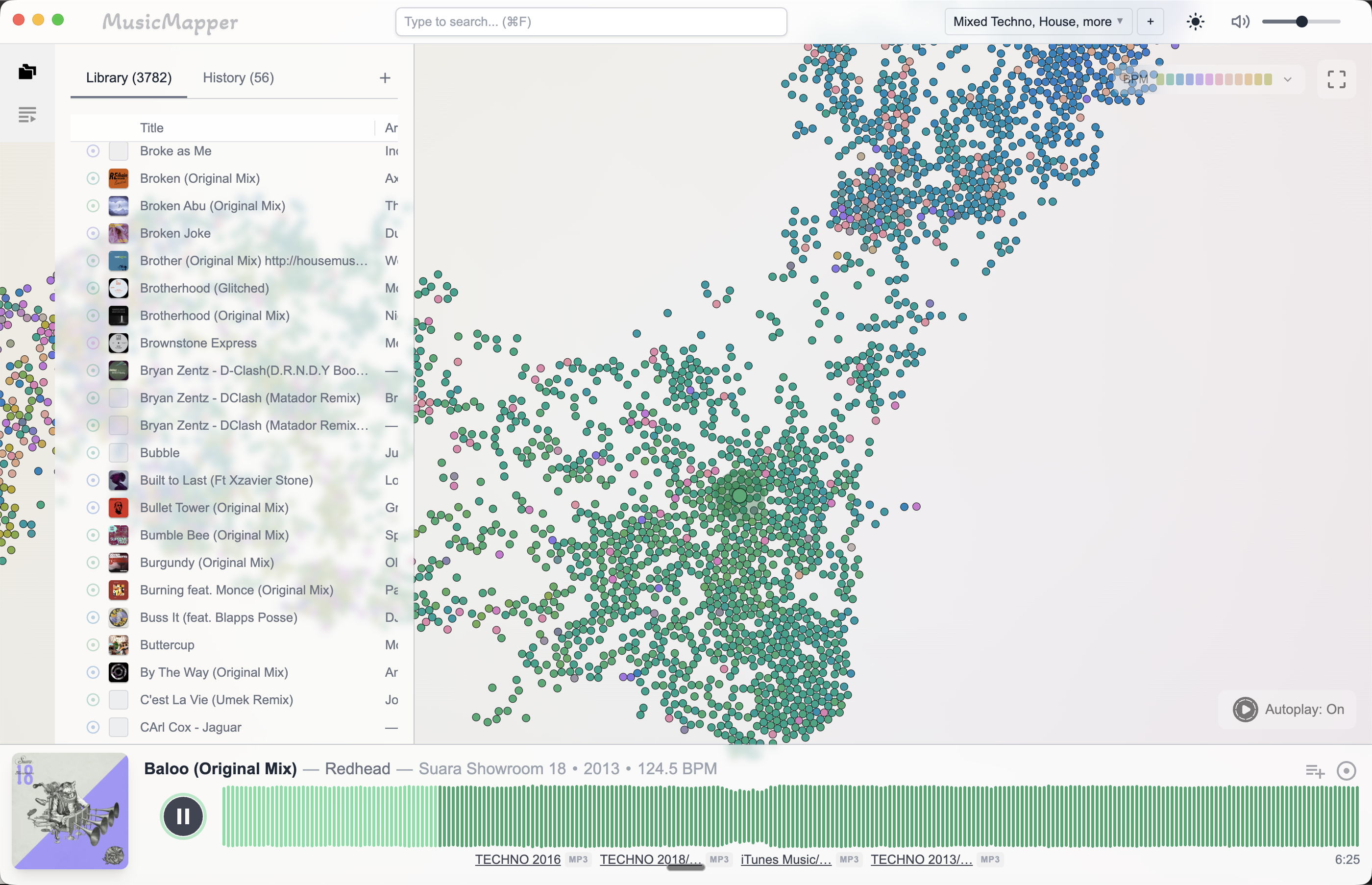
What it does is let you start from one track in your local library and explore outward — finding what is nearby, what is similar, what you forgot was there. The discovery is based on listening and relationship rather than keyword matching.
That makes it useful for a different moment in the workflow: after you have a direction, before you have a shortlist. It narrows the field from your own collection rather than from a streaming catalogue.
The clearest workflow combining both
For most DJs, AI tools and local library tools are not in competition. They solve different problems.
A reasonable combined workflow looks like this:
- Use AI or streaming discovery to find new tracks worth adding to your collection over time.
- When prep begins, start from your local library and use a discovery-first tool to build the shortlist from what you already own.
- Move that shortlist into Rekordbox, Serato, or whatever you use to prepare the final playlist and export.
The AI layer is useful upstream, for building the collection. The local library layer is where set prep actually happens for most serious DJs.
Final takeaway
AI DJ tools are improving quickly, and they are worth paying attention to. But most of them are built around streaming and prompt-based generation, not around the problem of surfacing the right tracks from a large local collection you already own.
If that local library problem is the one you actually have, a discovery-first tool built for your own files is still the more direct answer.
For the broader set prep workflow, read How to prepare a DJ set from your local collection. If library size is the specific challenge, How to find matching tracks in a large local DJ library covers that directly.
Explore MusicMapper
See how the workflow looks on your own music library.
MusicMapper helps you explore a local collection as a visual map, preview similar tracks quickly, and build playlists for sharper set preparation.
Frequently asked questions
Can AI DJ tools work with a local library instead of streaming?
Some can. Rekordbox's Collection Radar and a few standalone tools will analyse your local files. But most AI set builders are designed around streaming catalogues, which makes them less useful when your real asset is a large, carefully curated local collection.
Where does MusicMapper fit in an AI-assisted DJ workflow?
MusicMapper works on your local library directly. It is strongest in the discovery and shortlisting stage — finding which tracks from your own collection actually belong together — before you move into export or performance tools.
Keep Reading
Related articles
Guide
How to Find Matching Tracks in a Large Local DJ Library
When a DJ library gets large, the problem is rarely a lack of good music. The real problem is surfacing the right tracks fast enough. The easiest fix is to stop treating discovery as a folder problem and start treating it as a listening and relationship problem.
Guide
How to Prepare a DJ Set From Your Local Collection
The easiest way to prepare a stronger DJ set from your local collection is to split the work into two stages. First, discover and shortlist. Then organize and finalize. Most DJs create friction when they try to do both jobs at the same time.
Guide
How MusicMapper Fits Into a Rekordbox Workflow
MusicMapper works best before Rekordbox, not instead of it. Use MusicMapper to find matching tracks and shape the shortlist, then move that playlist into Rekordbox for final preparation, export, and performance.