It's Tuesday night. Gig on Friday. You open your library — eight thousand tracks — and you know there is something perfect in there. Forty-five minutes later, you are back on the same shelf of music you always use. You did not find anything new. You did not even search most of the library. You just eventually gave up and went with what you already knew.
This is not a you problem. It is a tool problem.
Why folders and playlists break at scale
Folders, crates, and playlists are the standard answer to library organisation. And for a library of a few hundred tracks, they work fine. You know what is in each folder. You remember when you last used something. You can hold the rough shape of the collection in your head.
Past a few thousand tracks, that changes completely.
The structure that was supposed to help you navigate starts to hide things instead. You cannot remember which folder a track ended up in. You built playlists at different points in your taste development, and half of them no longer reflect how you actually think. You search by track name when you happen to remember one — but most of the time, you are not looking for a specific track. You are looking for something that fits a feeling you have not found words for yet.
Search boxes cannot answer that. Folders cannot answer that. Neither can memory, when the library has grown larger than what memory can hold.
So you default. You reach for the tracks you already know. And the other seven thousand sit there untouched.
The irony of the growing library
Here is the pattern that plays out in almost every large DJ collection.
You keep buying music. The library grows. But the pool of tracks you actually play in sets stays roughly flat — a few hundred in active rotation, regardless of the total size. Every track you add to your collection that does not quickly find its way into a set gets harder to reach over time. It drifts toward the back. It stops feeling accessible.
What you end up with is a library that is simultaneously enormous and thin. Enormous in raw number. Thin in the part you can actually navigate under pressure.
The size is not doing you any favours with the tools you are using. But that is a statement about the tools, not about the music.
What changes when you work from a visual map
The problem with folders and playlists is that they are organisational structures built around categories you decided on in the past. They cannot respond to the question you are asking right now: what belongs next to this specific track, in this specific set, for this specific gig?
A visual similarity map works differently.
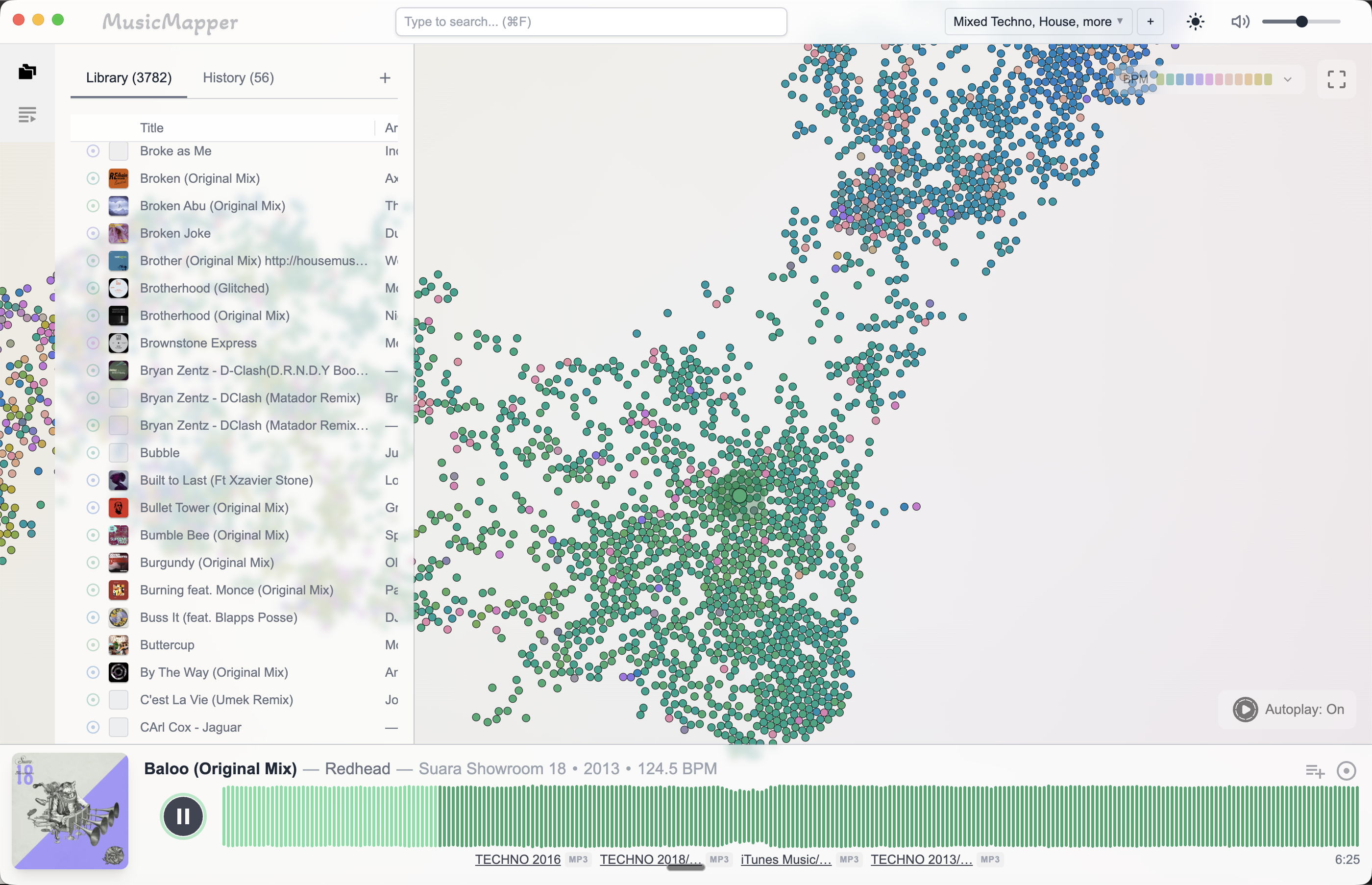
Instead of sorting your library into fixed buckets, it arranges tracks by how they relate to each other sonically — similar energy, similar texture, similar feel. Tracks that belong near each other end up near each other on the map. You do not browse categories. You start from one track you trust and explore outward.
That is a fundamentally different kind of navigation. You are not asking the library to remember what genre something is. You are asking it to show you what fits.
Why more tracks is actually better in this model
Here is where the framing flips.
When you navigate by folder or playlist, more tracks means more decisions and slower prep. The library works against you.
When you navigate by visual similarity from a reference track, more tracks means more candidates the engine can surface around that reference. A library of 8,000 tracks contains more potential matches near any given anchor than a library of 800. The similarity search has more to work with. It can find things that genuinely fit — tracks you bought years ago that have been sitting in the dark — and surface them directly, without you having to remember they exist.
This is the specific moment where MusicMapper changes what a large library means.
You pick a reference track for the gig. MusicMapper scans your full local collection and shows you what clusters around it — not by BPM range or genre tag, but by sonic relationship. The tracks that surface are candidates you might not have thought of, sitting in parts of your library you have not visited in months. The bigger your collection, the more material there is for that search to pull from.
A small, well-curated library is easier to navigate with traditional tools. If you have 500 tracks and know every one of them, folders and memory will mostly get you there.
But if you have been collecting music for years and your library has grown past the point where memory can do the job, the right answer is not to cut it down. It is to change how you navigate it.
A large library navigated by similarity is faster and surfaces better options than a large library navigated by folder. You get the depth you have been building, and you actually reach it.
Final takeaway
A large DJ library is not a problem in itself. The problem is using tools designed for small libraries to navigate a large one.
Folders, playlists, and search work up to a point. Past that point, they hide more than they reveal. A visual similarity map turns the library's size from a burden into an asset — the more tracks you have, the more candidates it can surface around the reference you are working from.
For the practical side of finding what belongs near a reference track, read How to find matching tracks in a large local DJ library. If you want to rediscover what has drifted to the back of your collection, read How to crate dig your own digital DJ library. For the full set prep workflow, read How to prepare a DJ set from your local collection.
Explore MusicMapper
See how the workflow looks on your own music library.
MusicMapper helps you explore a local collection as a visual map, preview similar tracks quickly, and build playlists for sharper set preparation.
Frequently asked questions
Does a bigger DJ library make set prep harder?
It depends on the tool. With traditional folder and playlist navigation, yes — more tracks means more decisions and slower prep. With a visual similarity map like MusicMapper, a bigger library is actually an advantage, because the similarity engine has more candidates to surface around your reference track.
How do I make better use of a large DJ library?
Stop navigating by folder or search term and start from a reference track instead. A similarity-based tool can scan the full library and surface what belongs near that reference — so the size of your collection works for you, not against you.
Keep Reading
Related articles
Guide
How to Find Matching Tracks in a Large Local DJ Library
When a DJ library gets large, the problem is rarely a lack of good music. The real problem is surfacing the right tracks fast enough. The easiest fix is to stop treating discovery as a folder problem and start treating it as a listening and relationship problem.
Guide
How to Crate Dig Your Own Digital DJ Library
The best crate digging you can do isn't on Beatport or Bandcamp — it's inside the collection you already own. Most DJs have hundreds of strong tracks sitting unplayed. The problem isn't the music. It's the way a large library makes those tracks invisible.
Guide
How to Prepare a DJ Set From Your Local Collection
The easiest way to prepare a stronger DJ set from your local collection is to split the work into two stages. First, discover and shortlist. Then organize and finalize. Most DJs create friction when they try to do both jobs at the same time.