You are an hour into set prep. You have your anchor track. You know roughly where the set needs to go next — something more driving, harder in the low end, still hypnotic but with more tension.
You sort by key. Your anchor is 8A. You filter to 8A and neighboring positions — 7A, 9A, 8B. Four hundred tracks. Now you scroll.
Ten minutes later, nothing has landed. Somewhere in those four hundred, the right track almost certainly exists. You just cannot find it from here.
What key sorting actually does
Key sorting is a compatibility filter. That is a real and useful thing.
When you filter to harmonically matching Camelot positions, you remove options that will likely clash. Five thousand tracks become four hundred. That is progress. Fewer wrong answers is genuinely helpful.
The problem is what you are left with. Four hundred technically compatible tracks is not a shortlist. It is still an overwhelming field. Within that field, key gives you no further information. Every track scores the same. The one that is perfect for this moment and the one that would completely derail the energy are both sitting in 8A, indistinguishable by the column you are sorted on.
You are back to scrolling and memory. The filter helped narrow the problem. It did not help solve it.
Compatible is not the same as right
Harmonic compatibility is a necessary condition, not a sufficient one.
Two tracks can share a Camelot code and have nothing to say to each other. They might be in the same key at completely different energy levels, or with textures that pull the room in opposite directions. Key compatibility means they probably will not clash melodically. It says nothing about whether they belong together in this set, at this moment, after this specific track.
What makes a track right is relational. It is about how it sits next to what you already have — whether the energy shift feels intentional, whether the texture contrasts or complements in a way the room will feel. Those are listening judgments. They do not live in a metadata column.
This is the same trap as genre sorting, just with a more technical wrapper. Genre tells you a track's style. Key tells you its harmonic compatibility. Neither one tells you how a track functions in the context of a live set you are building right now.
What you are actually looking for
The question you are asking during set prep is not "what has a compatible key?"
It sounds more like: what has the same kind of pressure as this track but releases it differently? What could shift the energy upward without changing the emotional register? What has a different texture but the same underlying feel?
Those are questions about sonic relationship. Key is one dimension of that relationship — not the whole picture. A track can pass the key test and fail every other dimension that actually matters for the moment you are building toward.
A different navigation approach
Instead of asking "what is technically compatible with my anchor?" try asking "what is genuinely close to my anchor?" Not just in key, but in texture, energy shape, and sonic character overall.
That is a different kind of search. It starts from the track itself — from what it actually sounds like — rather than from one metadata value.
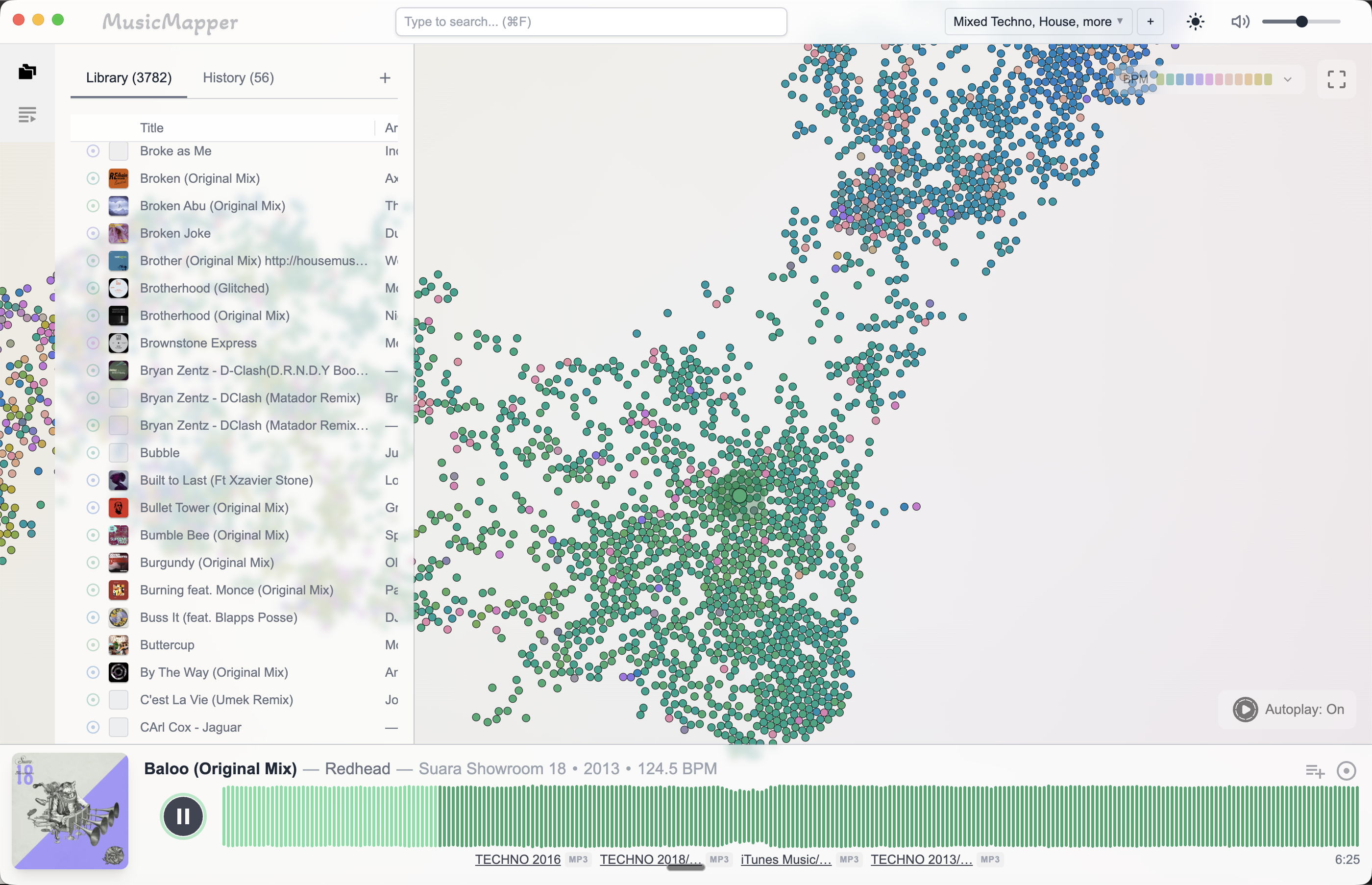
This is how MusicMapper approaches the problem. You start from one track and it maps your local library by sonic similarity, surfacing what genuinely clusters nearby in feel, texture, and energy. Key is part of the similarity calculation, but one ingredient among several — you never sort a Camelot column to use it.
One thing worth saying plainly: key tagging is still useful. Accurate key detection from Mixed In Key or Rekordbox saves real time, and knowing two tracks share a compatible position is useful information when evaluating a specific transition. Keep that data in your library. The problem is using it as your primary discovery layer during prep — treating a technical constraint as a creative navigation tool. Those are different jobs.
Use key data as a check, not a search strategy.
Final takeaway
Sorting by Camelot code narrows your library. It does not help you find the right track within the narrowed result.
Harmonic compatibility is a floor — a technical minimum. What makes a track actually belong in a set is relational, and it is something you hear but cannot filter for.
If you get stuck inside a large pool of technically correct options, the fix is usually to change how you navigate: start from one track and move toward what sounds genuinely nearby, rather than filtering for what passes a single metadata check.
For the broader problem of finding matching tracks in a large library, read How to find matching tracks in a large local DJ library. For why genre-based navigation runs into the same limits, read Genre tags won't help you find the right track for a DJ set. To rediscover tracks you have stopped using, read How to crate dig your own digital DJ library.
Explore MusicMapper
See how the workflow looks on your own music library.
MusicMapper helps you explore a local collection as a visual map, preview similar tracks quickly, and build playlists for sharper set preparation.
Frequently asked questions
Should I still use Mixed In Key or key tagging for my DJ library?
Yes — key information is worth having, and good key detection saves real time. The problem is using it as your primary navigation layer during set prep. Key tells you what's technically compatible. It doesn't tell you what's musically right for a specific moment.
What's a better way to find the right next track during set prep?
Start from one track you trust and look for what sits nearby in feel and sonic texture — not what shares a Camelot code. A discovery tool like MusicMapper works this way, letting you explore outward from a reference track by similarity rather than by metadata column.
Keep Reading
Related articles
Guide
Genre Tags Won't Help You Find the Right Track for a DJ Set
When you're mid-set prep looking for something darker, more driving, or just a bit more raw, your genre folders don't help. Genre describes what a track is — its origin and style — not what it does in the context of a specific set. That mismatch is why so many DJs spend years organising their libraries and still can't find the right track when they need it.
Guide
How to Find Matching Tracks in a Large Local DJ Library
When a DJ library gets large, the problem is rarely a lack of good music. The real problem is surfacing the right tracks fast enough. The easiest fix is to stop treating discovery as a folder problem and start treating it as a listening and relationship problem.
Guide
How to Crate Dig Your Own Digital DJ Library
The best crate digging you can do isn't on Beatport or Bandcamp — it's inside the collection you already own. Most DJs have hundreds of strong tracks sitting unplayed. The problem isn't the music. It's the way a large library makes those tracks invisible.