You have two tracks you want to play in the same set. One is your opener for the second half. The other is the track the whole night has been building toward. They are both obvious choices.
The problem is they do not mix. Different key. Different energy shape. The jump between them would feel wrong, even with a long blend.
The answer is usually not to drop one of them. It is to find a bridge.
What a bridge track actually does
A bridge track is the one you put between two tracks that refuse to sit next to each other.
It is not just any track that happens to be compatible with both. It carries the feel of the first track for long enough to hold the room, then moves the key, tempo, or texture close enough to the second that the next transition becomes natural. The bridge earns its place by doing work neither of the other two can.
The mixing technique side of this is well covered — EQ tricks, loops, quick cuts, drum-only outros. Those matter, but they are downstream. The harder problem is picking the right bridge track in the first place.
Why this is a discovery problem, not a mixing problem
Most advice on bridge tracks is about how to execute the transition once you have one.
The harder part, for anyone with a large local library, is finding it. You are looking for a track that is similar enough to the outgoing one to preserve the feel, and different enough from it in the direction of the incoming one. No single metadata column tells you where that lives.
Sort by key and you get a list of harmonically compatible tracks. Most will not function as a bridge. Sort by BPM and the same thing happens. The right bridge is the one whose overall sonic character splits the difference between your two anchors, and that is a listening judgment, not a filter.
What a good bridge track has
In practice, the tracks that work as bridges tend to share a few things.
They sit between the two anchor tracks in energy — not at the peak of the outgoing, not yet at the level of the incoming. They hold a texture that feels related to the first but does not actively fight the second. They often have a fairly neutral structure — a long intro, a breakdown, or a section where the arrangement thins enough to let a new direction emerge without a collision.
Bridge tracks rarely announce themselves. They are usually songs you would not pick as a highlight on their own. Their value is relational. They make the tracks around them work.
How to find one without scrolling for an hour
The usable approach is to treat the two anchors as starting points and explore between them.
Start from the outgoing track and look for what sits close to it in feel — not just in key. Collect a handful of candidates. Then do the same from the incoming track, looking backward. The overlap between those two neighbourhoods is where the bridge almost certainly lives.
You are not sequencing yet. You are building a small pool of candidates that belong near both tracks, then listening to a few against each anchor to see which one carries the feel across.
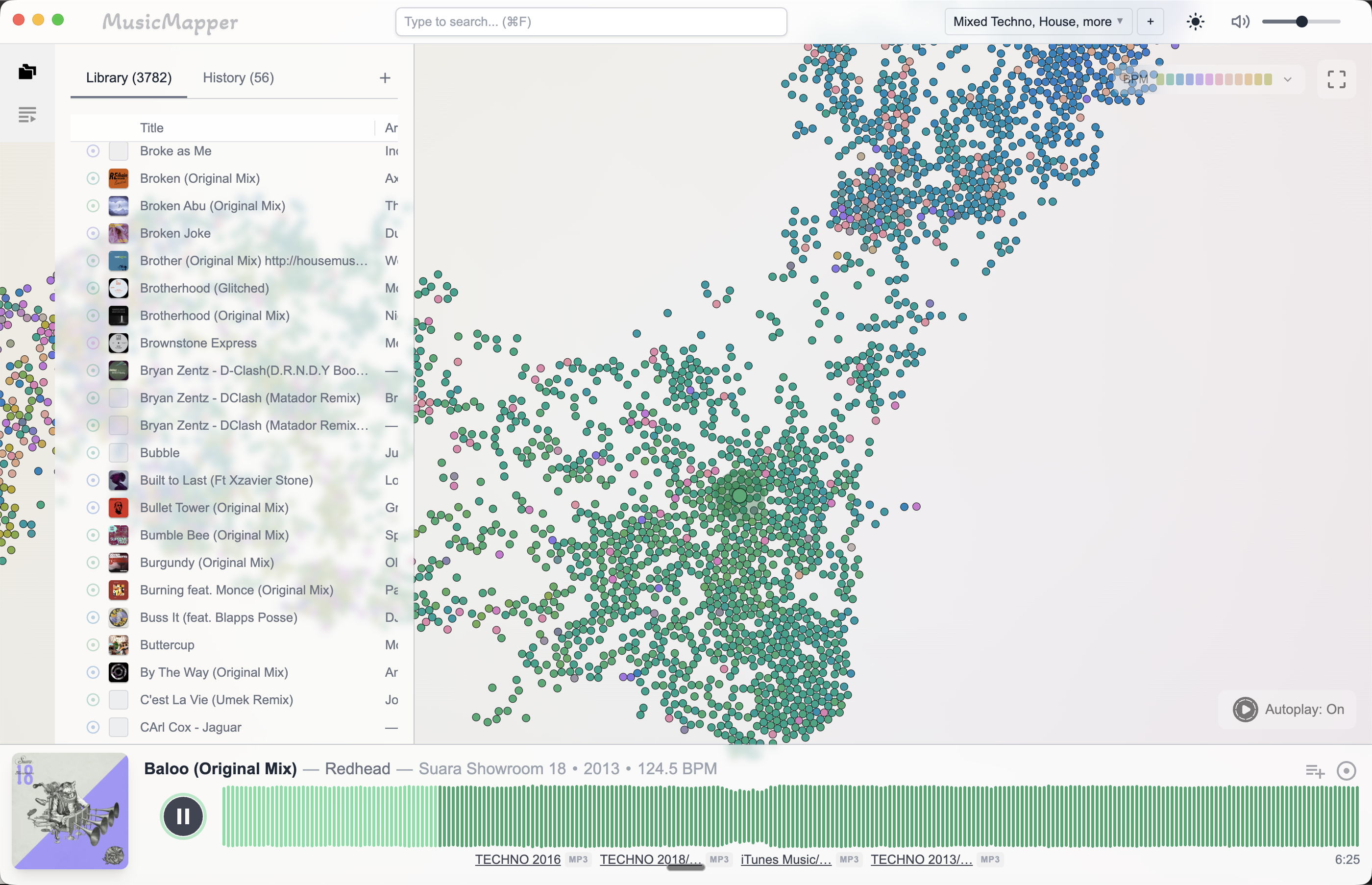
This is the kind of search that gets slow when the library is large. You are not looking for one thing in a column — you are looking for a track that meets several soft criteria at the same time, and only listening will confirm it.
Where MusicMapper fits — and where it stops
MusicMapper is built for this kind of exploration. You drop in an anchor track and it maps your local library by sonic similarity. Do it twice — once from each anchor — and you can see which tracks appear in both neighbourhoods. Those are your bridge candidates.
That turns a long scroll into a short listening session.
What it does not do is decide the transition for you. It will not tell you where in the track to mix, how to EQ the low end, or whether the blend needs a loop. Those are still yours to work out on the decks.
If your library is small enough to recall from memory, you probably do not need this. Bridge thinking still helps, but the discovery part can happen in your head.
Final takeaway
The two tracks you are trying to connect are rarely the problem. The missing connector is.
A bridge track is a specific kind of discovery — something that sits between two anchors by feel, not just by key or tempo. It is easier to find if you explore outward from both anchors at once and look for the overlap, rather than scrolling or filtering from one direction.
For the broader discovery problem, read How to find matching tracks in a large local DJ library. For why key sorting alone will not land you on the right bridge, read Why sorting your DJ library by key won't build your set. For the shortlist stage that usually sits around this kind of work, read How to build a DJ shortlist before a gig.
Explore MusicMapper
See how the workflow looks on your own music library.
MusicMapper helps you explore a local collection as a visual map, preview similar tracks quickly, and build playlists for sharper set preparation.
Frequently asked questions
What is a bridge track in a DJ set?
A bridge track is the song you put between two tracks that do not mix cleanly on their own. It keeps the feel of the outgoing track alive while moving the key, tempo, or texture closer to what the incoming track needs. Its job is to make a transition possible that otherwise would not be.
How do I find a bridge track in my own DJ library?
Start from the two tracks you are trying to connect and look for something that sits between them by feel — similar energy to the first, closer in texture or tempo to the second. Key and BPM narrow the field, but the right bridge is usually the one whose overall sonic character splits the difference. A discovery-first tool that maps your library by similarity makes this much faster than scrolling.
Keep Reading
Related articles
Guide
How to Find Matching Tracks in a Large Local DJ Library
When a DJ library gets large, the problem is rarely a lack of good music. The real problem is surfacing the right tracks fast enough. The easiest fix is to stop treating discovery as a folder problem and start treating it as a listening and relationship problem.
Guide
Why Sorting Your DJ Library by Key Won't Build Your Set
Key sorting narrows a 5,000-track library down to 400 technically compatible options. That sounds like progress. But you still have to find the right ten tracks within those 400, and key tells you nothing about which ones they are. Harmonic compatibility is a floor, not a destination.
Guide
How to Build a DJ Shortlist Before a Gig
A shortlist is the step most DJs skip — going straight from a library of thousands down to a final set in one pass. That's why set prep is slow and why you end up defaulting to familiar weapons. The shortlist is not a nice-to-have. It's the mechanism that makes good track selection possible.